
With #StayAtHome and social distancing now becoming a way of life, an increasing number of people are relying on the internet for work, education and entertainment. This has placed greater demand on our network infrastructure, reducing the bandwidth available for each user, and is leaving people frustrated at seemingly slow internet speeds.
While internet service providers such as TPG or Telstra may not be able to instantly respond to these changes, there are a few tricks you can use to boost your home internet’s speed.
Why is your internet slow?
There may be many reasons why your internet speed is slow. Internet use requires a reliable connection between your device and the destination, which may be a server that is physically located on the other side of the world.
Your connection to that server could pass through hundreds of devices on its journey. Each one of these is a potential failure, or weak point. If one point along this path isn’t functioning optimally, this can significantly affect your internet experience.
Web servers in particular are often affected by external factors, including Denial of Service (DOS) attacks, wherein an overload of traffic causes congestion in the server, and impedes proper functioning.
While you may not have control over these things from your home network, that doesn’t mean you don’t have options to improve your internet speed.
Wifi signal boost
The access point (wireless router) in your home network is used to connect your devices to your internet service provider. Most access points provide a wireless signal with limited channels, which can suffer interference from nearby signals, like your neighbour’s. A “channel” is a kind of virtual “pipe” through which data is transferred.
Although your devices are designed to avoid interference by switching channels automatically (there are usually 14 available), it may help to check your router settings, as some are set to a single channel by default. When trying different options to reduce interference, it’s advisable to select channels 1, 6 or 11 as they can help to minimise problems (for 2.4GHz wireless).
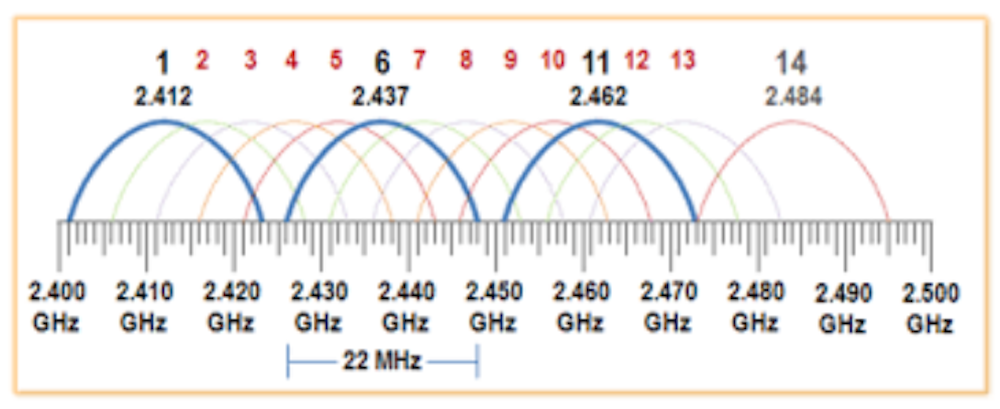
Frequency and Channel Distribution for the 2.4GHz. Rob/Stack Exchange, CC BY-SA
What else can you do?
There are further things you can try to improve your wifi signal. If your router supports 5GHz wifi signals, switching to this can provide a faster data rate, but over shorter distances. Reposition your router for best coverage (usually a central position).
The difference between 2.4GHz and 5GHz wifi signals is they have different data transmission speeds. While 5GHz can transfer data faster (with 23 available channels), 2.4GHz provides a wider range. If you want speed, go for 5GHz. For better coverage, choose 2.4GHz.
Some domestic appliances can cause interference with your router. It’s worth checking if using your microwave oven, cordless phone or baby monitor affects your connection, as they may be using the same frequency as your router.
Using a wifi extender can help with coverage by boosting or extending the signal.
Viruses and malware
To avoid computer viruses, make sure you regularly check for updates on your devices and use antivirus software. It’s also worth rebooting your router to clear specific malware (malicious software designed to damage your device or server), such as VPNFilter – a malware that infects more than half a million routers in more than 50 countries.
You should also check the following:
-
does your router need to be replaced with a newer model? This may be the case if it has been used for many years. Newer models support enhanced functions and faster internet speeds
-
is the firmware of your wireless router updated? You can do this by visiting the device manufacturer’s website. This will help fix problems and allow additional functionality. It’s unlikely this update is done automatically.
Planning your internet usage
If multiple people are streaming video at your home, which often requires ten times the daytime demand, a limited internet connection will soon be fully used.
Try to plan your and family members’ online activities around peak times. Before the pandemic hit, most internet usage was likely oriented around the early evenings, after close of business. With the shift to remote working and schooling, more internet access is likely during the day, with a 10% usage increase overall, and a 30% increase at peak times.
Outside your home, connectivity is likely to be on a “best effort” plan, which shares a fixed bandwidth with other users. In other words, your mobile internet bandwidth is shared with others in your area when they access the internet at the same time. A shared bandwidth results in slower individual speeds.
You can’t control how many people access the internet, but you can manage your own internet activity by downloading large files or content overnight, or outside of peak hours (when there is less traffic).
How to improve your ISP’s network issues
While you can try to fix issues and optimise the setup inside your home, unfortunately you can’t really influence network performance outside of it. Thus, contacting your internet service provider’s call centre and seeking support is your best option.
All of the above considered, it’s important to remember that when using the internet, we’re sharing a limited resource. Just like buying pasta or toilet paper, there are many who need it just as much as you, so use it wisely.