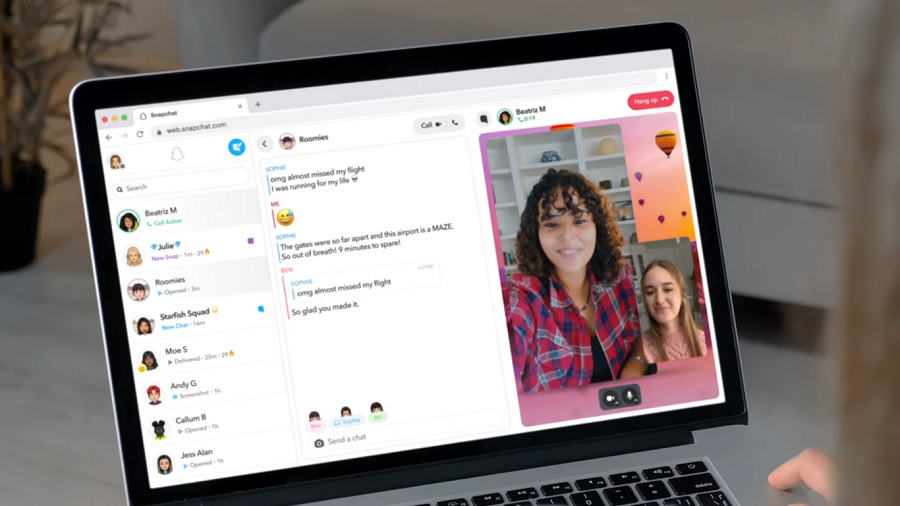
Snapchat is finally getting a web desktop version that will initially offer some of the app’s features, including video calling and private chats. However, its launch will be exclusively available to people paying for a Snapchat+ subscription.
Snap officially announced the Snapchat for Web on Monday and confirmed that its current version would allow users to initiate video calls or send and read messages on a desktop browser. The social media company said in a blog post that users would be able to “pick up where chats left off on mobile,” suggesting that Snapchat for Web will be able to sync their messages from the app to the web. This likely works similarly with web versions of messaging apps.
“With so many in our community spending more time online, whether it is for remote learning or working, streaming or just plain browsing – we saw a huge opportunity to make it easier for our community to stay connected throughout their day,” Snapchat said (via TechCrunch). “And we cannot wait to bring our favorite fundamental Snapchat capabilities to the web.”
To use Snapchat for Web, Snapchat users are advised to use the Google Chrome browser and open web.snapchat.com. The site will ask them to log in with their username or email address and password, while new users can sign up for an account on this page.
Snapchat for Web is also confirmed to support popular messaging features from the app, including Chat Reactions and Chat Reply. The company noted that support for Lenses effects will be added “soon.”
As mentioned, Snapchat for Web will be initially available to Snapchat+ subscribers in select regions, namely Australia, Canada, New Zealand, the United States, and the United Kingdom. The company also confirmed Snapchat for Web would be available worldwide. But it will first go live in other countries where Snapchat+ is available (France, Germany, Saudi Arabia, and the United Arab Emirates) before it gets a global launch.
Meanwhile, other popular messaging features on the Snapchat app will also be available on Snapchat for Web. Messages will automatically disappear 24 hours after they are sent. The desktop service will also prohibit users from taking screenshots. The web desktop version of the app is also planned to support other features like Stories and Memories.