


 Zcash Plans Quantum-Resistant Security Upgrade for January
  TSMC Profit Set to Surge 65% as AI Chip Demand Drives Record Earnings
  Meta Launches Muse Wonder AI Models, Shares Rise 3.7%
  NEAR Protocol Leads AI Crypto Rally Amid Fed Rate Hike Fears
  Apple Supplier Luxshare Faces US Patent Probe, Sees Limited Impact
  Yandex Data Center Hit by Drone Strike as Russia-Ukraine Cyber Infrastructure Attacks Escalate
  Nvidia Invests in Four French AI Companies to Expand European Presence
  Arm Shares Fall Over 3% After Qualcomm Wins License Dispute
  Robinhood Chain Eyes Priority Gas Auctions for Faster Trades
  Trump Buys Up to $25M in Meta Stock, Invests in SpaceX Debt
  Elon Musk Eyes Semiconductor Manufacturing Expansion With $15 Billion Terrafab Project
  AT&T Sells Mexico Wireless Business to Televisa for $2 Billion
  Citi Upgrades Galaxy Digital Stock, Raises Price Target to $28
  Samsung, SK Hynix Shares Fall as China's CXMT Advances DRAM Technology


 Add as a preferred source on Google
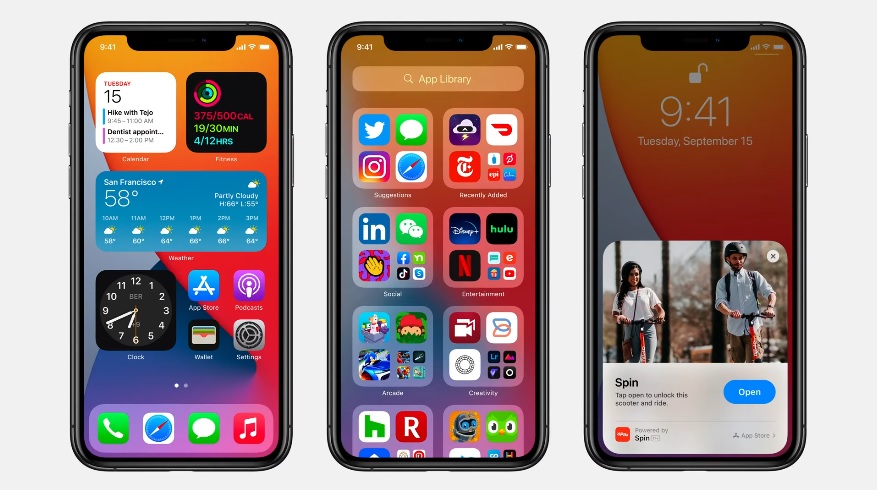
Months ago, the common belief was that the iOS 14 would be released once the new iPhones arrive since that has been the annual tradition for Apple. However, CEO Tim Cook surprised fans after announcing at the Time Flies event that OS updates are going live this week.
The iOS 14, along with iPadOS 14, watchOS 7, and tvOS 14, are confirmed to be released in full on Wednesday, Sept. 16. Of these updates, many are excited the most about the iOS 14 considering how much it is going to change the iPhone experience.
How to install iOS 14
As of this writing, there are reports that iOS 14 has started to roll out on compatible devices. The list includes all iPhones released from iPhone 6s and later, along with both iPhone SE models and iPod Touch 7.
Once the iOS 14 update is available for a user, they should receive an alert on the Settings app, from the General tab under the Software Update menu. Those who have yet to see a notification should not worry because the OS updates are never released all at once for all users around the world. The release date of Sept. 16 practically means to expect the update from this point.
When the update is available on the device, users can initiate the download and install process by tapping on the Software Update menu option. Make sure that there is enough free storage space available, around 5GB, and that the device has more than 50% battery charge left before starting the over-the-air installation. It would not hurt to save a backup of the device before updating it just to make sure that the user will not lose their files in case they encounter some issues in the installation.
iOS 14 delivers big changes in home screen and apps use
During the announcement of iOS 14’s release this week, Cook specifically mentioned the upcoming changes in the home screen such as the widgets customization options. This OS update marks the first time Apple is allowing iOS users to customize the widgets by size and shape and place them on any page of the home screen. Android users have been doing this for a long time now, so seeing this finally become possible on iPhones is a big deal for Apple fans.
Apple is also launching the App Clips, which allows iOS 14 users to try a streamlined version of an app by scanning various types of codes like QR or through an NFC tag. Once scanned, iOS users get to try the app’s features without having to install it.







