
Netflix released a new feature this week that should provide another layer of security for subscribers’ accounts. Members should now find the new “Manage Access and Devices” menu in the Account Settings, where they can easily stop someone from using their subscription for free.
“With the busy holiday season just around the corner, many of our members will be on the move and watching Netflix wherever they are traveling to see family and friends,” Netflix product manager Charles Wartemberg said in a blog post. “Logging in to your account while at a hotel or even your friend’s house is easy and intuitive, but occasionally people forget to log out.”
While Netflix put a holiday twist on the timing of the new feature’s launch, it could be useful any time of the year. With the Manage Access and Devices menu, subscribers should be able to remove someone’s access to their accounts without changing their password.
The Manage Access and Devices menu can be found in the Security & Privacy section of the Account Settings. It will display all recently logged-in devices in individual tiles, which include the profile they use, the timestamp of the last time they watched, and their approximate location.
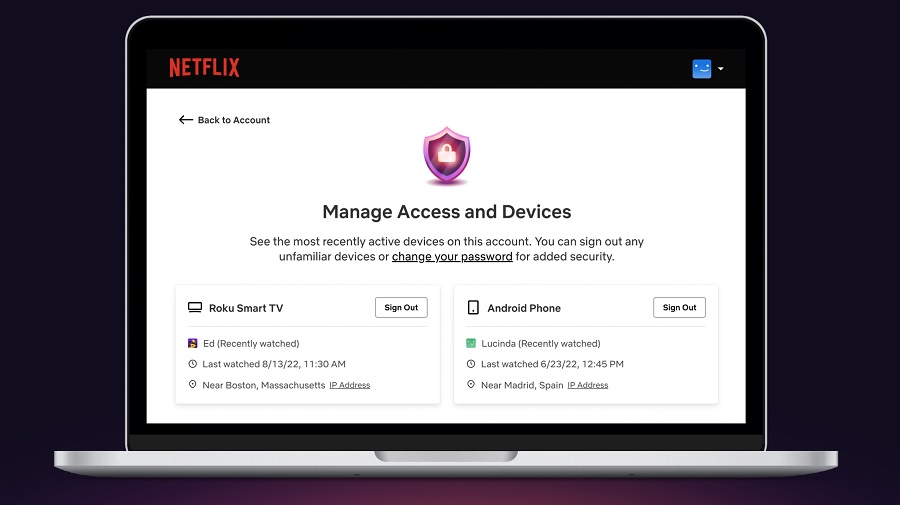
From Netflix
The new Netflix feature will also display the IP Addresses of each device that recently accessed an account. If any device, IP Address, and location seem suspicious, subscribers can easily click the Sign Out button on the top-right corner of each tile.
For best security practice, though, account owners should change passwords after signing out of unknown devices. Netflix’s Manage Access and Devices feature has started rolling out worldwide on the web, iOS, and Android.
Unlike other platforms, Netflix does not offer two-factor authentication. But it has other features that subscribers can use for some security. For one, each profile can be locked to require a four-digit PIN code before someone gains access to it.
It was primarily designed to avoid children from watching through a Netflix profile with no viewing restrictions. But it is still a good additional security option. To add a four-digit PIN code, open Account Settings and proceed to Profile & Parental Controls. Choose a profile, click the drop-down menu button, and look for the “Profile Lock” option.
Photo by freestocks on Unsplash